

Sep
Blog
Building a Four-Channel SMPTE ST 2110-20 Test Generator with the DekTec DTA-2110
Building a Four-Channel SMPTE ST 2110 Test Generator with DekTec
Following IBC 2026, we wanted to spend some more time exploring the capabilities of the DekTec DTA-2110 and, in particular, how easily it could be incorporated into our own software applications.
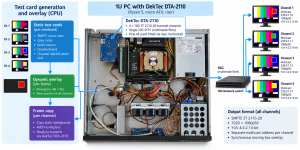
Our objective was fairly simple: build a software-generated test-card application capable of producing multiple independent SMPTE ST 2110-20 streams from a single PC.
What started as a fairly straightforward experiment turned into an interesting exercise in real-time video processing, and ultimately resulted in a four-channel 1080p50 ST 2110-20 generator that uses surprisingly little PC processing power.
We’ve now made the source code available on GitHub:
L2Tek DTA-2110 ST 2110 Test Card project on GitHub
Overview of System Requirement
Starting with the DekTec SDK
One of the attractions of the DekTec approach is the availability of the DTAPI SDK and example applications.
Rather than starting from scratch, we used DekTec’s AvFifo example as the basis for the transmitter. This provided the fundamental interface between our application and the DekTec hardware, leaving us free to concentrate on generating the video and managing multiple streams.
At its simplest, the transmit process is remarkably concise. The application attaches to the DekTec device, configures an AvFifo transmit FIFO with the required IP parameters and video format, obtains a video frame from the memory pool, assigns its presentation and RTP timestamps, and writes it to the FIFO.
The hardware and DTAPI then take care of getting that frame onto the network as an ST 2110-20 stream.
Generating our own test card
Rather than reading video from a file, we wanted the application to generate its own pictures.
We therefore wrote a small UYVY frame generator capable of producing SMPTE colour bars, grey ramps, solid colours and checkerboard patterns. A simple bitmap font renderer adds a separate identification label to each output.
Internally, the graphics are generated as 1920 × 1080 8-bit UYVY. Before transmission they are converted into the packed 10-bit 4:2:2 representation required by our DekTec transmit configuration.
Our eventual target was:
1920 × 1080p50, YUV 4:2:2 10-bit, SMPTE ST 2110-20
and we wanted four independently identifiable multicast streams running simultaneously.
One stream becomes four
Once the first stream was working, adding additional AvFifo instances was relatively straightforward.
Each channel has its own multicast configuration and identification, and the four transmit FIFOs are managed independently.
There was one interesting hardware consideration here. The DTA-2110 provides a finite number of hardware transmit pipes, while our application wanted four streams. DTAPI provides a useful option for precisely this situation:
AvFifo::HwOrSwPipe::PreferHwPipeThis allows DTAPI to use a hardware pipe where one is available and fall back to a software pipe where necessary.
With that in place, we had four independent ST 2110 streams.
But we had also created our next problem.
The 20 millisecond problem
At 50 frames per second, a new frame has to be ready every 20 ms.
Our first four-channel implementation generated a complete 1920 × 1080 image independently for each channel and then converted each image from our 8-bit working representation into the packed 10-bit format.
It worked — but only just.
Processing four complete frames was taking around 19–23 ms. As soon as processing occasionally exceeded the 20 ms frame period, the transmit FIFOs began to empty.
The symptoms were exactly what you would expect from a real-time system running out of headroom: initially everything looked fine, then FIFO levels gradually fell and eventually the video became unreliable.
It was tempting to regard this as a PC-performance problem.
It wasn’t.
Stop calculating things that don’t change
The important observation was that almost the entire test card was static.
For each channel, the colour bars and identification text don’t change from one frame to the next. We were spending most of our processing time repeatedly generating and converting exactly the same pixels.
So we changed the architecture.
At application startup we now generate four complete test cards, including their individual channel identification. Each is converted into the required packed 10-bit format once and retained in memory.
During transmission, the appropriate pre-rendered image is simply copied into the frame supplied by the DekTec FIFO.
That removed almost all of the expensive image generation and conversion from the real-time loop.
But how do we know it’s live?
A completely static test card presents another problem: looking at a monitor, it isn’t immediately obvious whether you’re seeing live video or a frozen frame.
So we retained one small dynamic element.
A 96 × 96 pixel box moves around the picture. Instead of regenerating the entire image to move it, the box itself is pre-generated as a small packed 10-bit patch.
For every video frame we copy the static background and then copy this tiny patch into its new position.
All four channels use the same box coordinates, so the movement is synchronised across the four outputs.
The amount of work required for the animation is therefore tiny compared with rendering and converting four complete HD images.
The result
That architectural change made a dramatic difference.
Our original four-frame render-and-convert approach required approximately 19–23 ms per frame cycle.
With the static backgrounds and lightweight dynamic overlay, this dropped to approximately:
1.7–2.2 ms per four-channel frame cycle.
During our testing, the complete four-channel application was using only around 4% CPU and approximately 200 MB of memory on the development PC.
More importantly, the DekTec FIFO levels remained healthy and all four 1080p50 streams ran continuously.
The optimisation wasn’t about finding a faster processor or adding more threads. It was simply about recognising which work actually needed to happen in real time.
A useful ST 2110 development tool
The resulting application has proved to be a useful little test tool in its own right.
It produces four separately identified 1080p50 10-bit ST 2110-20 multicast streams, provides visible movement to confirm that the streams are live, and allows multicast parameters to be changed in the configuration.
It has also provided us with a useful starting point for understanding the DekTec DTAPI and AvFifo programming model before moving on to more ambitious applications.
The project remains deliberately simple. It isn’t intended to replace a commercial broadcast test generator; it’s an engineering example showing how relatively little application code is required to generate useful ST 2110 video with the DekTec hardware and SDK.
Source code
We’ve made the project source available on GitHub for anyone interested in experimenting with it:
DTA-2110 ST 2110 Test Card Transmitter — GitHub
The repository contains our Visual Studio project, test-pattern generator, four-channel implementation and documentation.
The DekTec SDK itself is not included. You’ll need to download and install the appropriate DTAPI SDK and device drivers from DekTec in order to build and run the application.
The code was developed from the example code supplied with the DekTec SDK, with the test-pattern generation, multi-channel implementation, static-frame optimisation and dynamic overlay developed as part of our L2Tek project.
